The Problem
Complex Project Coordination: Spectra Solar manages UK-wide solar projects—from initial enquiry and system configuration to on-site installation and completion—requiring coordination across multiple companies, installers, vans, equipment movements, and installation activities.
Limited Legacy App Functionality: The existing React Native field service app only offered basic job and sales-order access without the controls and tracking needed for complete field workflows.
Lack of Inventory Tracking: Installers could only view basic or static equipment information and could not track stock movements (warehouse-to-van and van-to-customer).
Inflexible Sales Orders: Installers lacked the ability to properly adjust sales-order quantities in the field.
Workflow and Compliance Gaps: The application lacked structured, Odoo-connected processes for:
Separate installation and non-installation workflows
Company-specific safety checklists
Lead-related documents and media management
Automated customer emails driven by installation feedback
Challenges
The project involved several operational and technical challenges that needed to be addressed within a single, connected workflow.
- Multi-Company Job Management Spectra Solar operates multiple companies in Odoo. Each job needed to be associated with the correct company and assigned installer so job ownership and field activities could be tracked appropriately.
- Job Acceptance and Rejection Tracking The application needed to record whether an installer accepted or rejected an assigned job and reflect the relevant status in Odoo.
- Two-Stage Inventory Tracking Equipment movement needed to follow two distinct routes: warehouse to van, and van to customer location. The previous workflow did not provide the required end-to-end stock movement tracking.
- Sales-Order Quantity Management Installers had limited visibility into equipment information and could not increment or decrement sales-order quantities in the field. The new workflow needed controlled quantity adjustments connected with the corresponding Odoo records.
- Separate Installation and Non-Installation Workflows Not every scheduled activity requires a physical installation. The application needed to distinguish between installation and non-installation jobs, applying the appropriate screens, permissions, and actions to each.
- Automated Customer Communication Spectra Solar required a configurable email workflow that could send customers a summary of installed items based on the installer's feedback checklist, with the relevant feedback recipient copied (CC) as configured.
- Structured Field Documentation and Feedback Installers needed dedicated screens for company-specific health and safety checklists, lead-related documents, media uploads, installation confirmation, and installer and customer feedback.
- Backward-Compatible API Integration The redesigned application needed to support the new multi-company and field-service requirements while maintaining compatibility with Spectra Solar's existing Odoo workflows.
Solution
AALogics redesigned and rebuilt the Spectra Solar Field Service App using React Native, integrating it with Odoo through backward-compatible APIs. The solution introduces a structured workflow connecting scheduled activities, company and installer assignments, equipment allocation, stock movements, field checklists, installation completion, and customer communication.
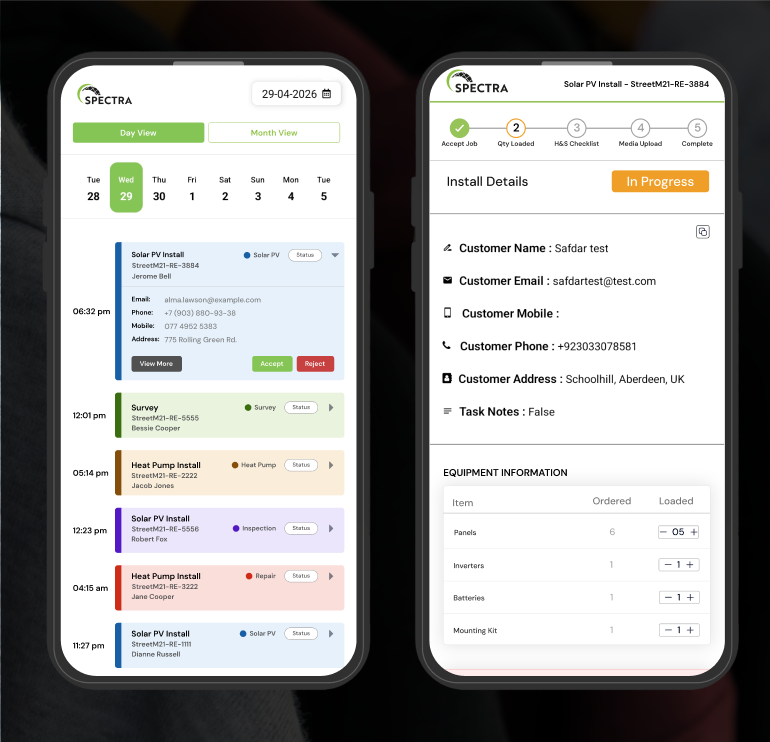
- Normal Installation Flow: Installers can accept an assigned job, review its details and associated sales order, inspect equipment information, and adjust permitted item quantities. The workflow supports stock loading from the warehouse into the van, followed by the required safety, media, installation, and feedback steps.
- Non-Installation Flow: Sales-order information is read-only. Installers can view an existing sales order but cannot change its quantities or perform installation-related stock actions. If no sales order exists, it is not displayed, and the van and Confirm Installation screens are skipped.
- Multi-Company Job Management: Each job is connected with its relevant Odoo company and assigned installer, while job acceptance or rejection is tracked in Odoo.
- Warehouse-to-Van Inventory: Equipment is loaded from the warehouse into the assigned van, with relevant loading quantities and installation documents available to the installer.
- Van-to-Customer Inventory: Equipment movement is tracked as it moves from the van to the customer's installation location. For normal installation jobs, field quantity adjustments support verification against relevant sales-order and delivery records.
- Automated Customer Emails: When enabled, a job-completion email uses a designated template to summarize installed items based on the installer's feedback checklist. The relevant feedback recipient is copied (CC) according to the configured process.
- Connected Field Workflow: Job scheduling, field execution, equipment tracking, checklists, documentation, and customer communication are brought into a more consistent Odoo-connected workflow.
Project status: The application is live and being used by dozens of engineer.
Our Approach
Features Developed
- Multi-Company Management Associates jobs with the correct Odoo company and responsible installer.
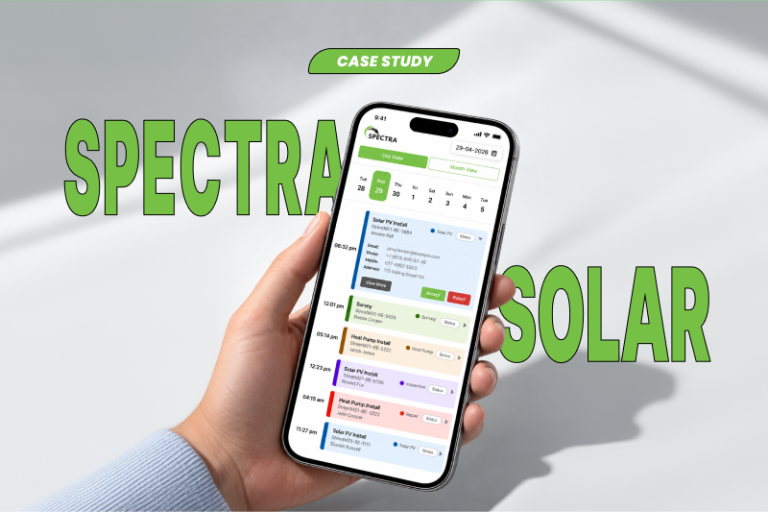
- Calendar and Job Management Displays assigned jobs and allows installers to accept or reject scheduled work.
- Normal and Non-Installation Flows Applies different screen sequences and permissions according to the scheduled activity.
- Sales-Order Quantity Controls Supports incrementing and decrementing permitted item quantities during normal installation jobs.
- Two-Stage Inventory Routing Tracks equipment movement from warehouse to van and from van to customer location.
- Equipment and Loading Details Provides equipment information, quantities, and relevant installation documents when loading available stock.
- Van Checklist Prompts installers to complete the van checklist when required and repeats the prompt after seven days rather than showing it again before that period.
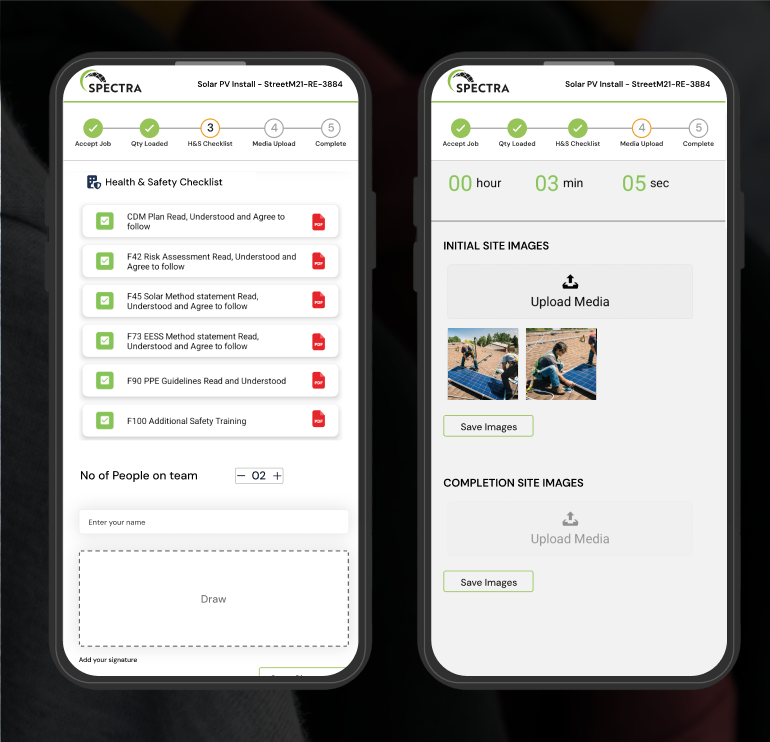
- Company-Specific Health and Safety Checklist Presents the relevant health and safety checklist for the assigned company.
- Lead-Specific Document Tab Displays documents associated with a particular lead, including attached files.
- Lead-Specific Media Screen Displays media uploaded for the relevant lead and supports field media uploads.
- Installation Confirmation Provides a dedicated screen for confirming installation activities, including panels and inverters, at the customer location.
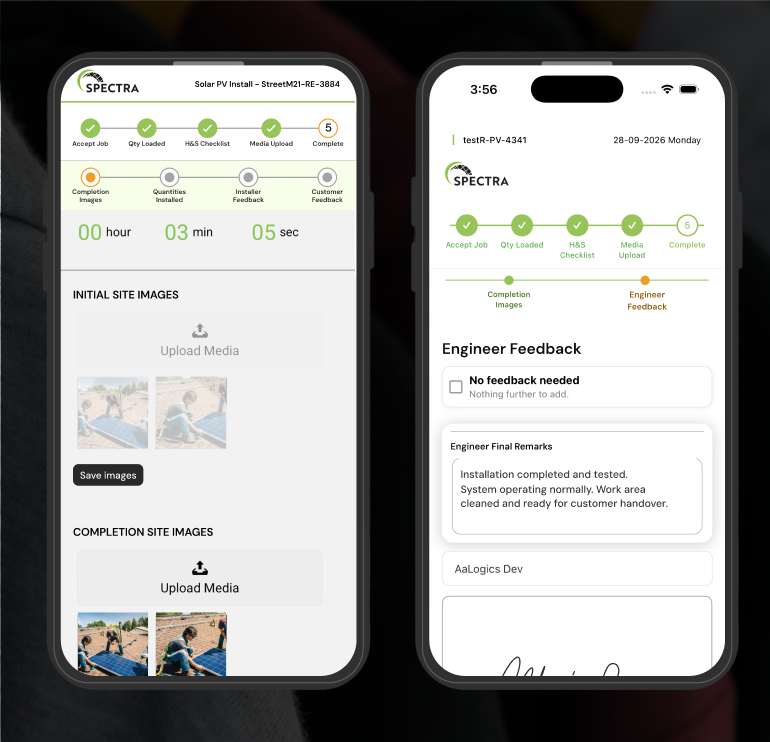
- Installer Feedback Captures the installer's feedback following the installation workflow.
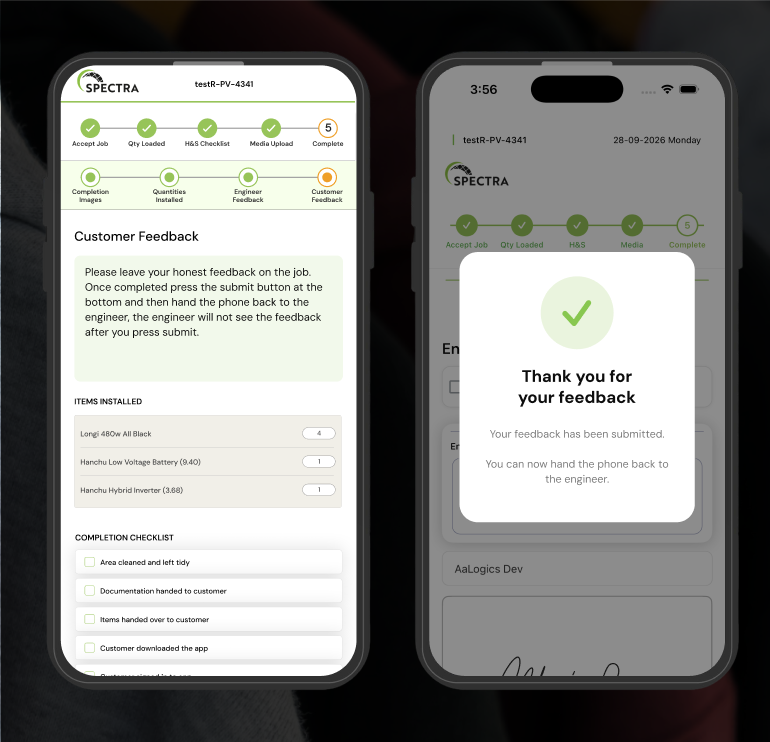
- Customer Feedback Includes a dedicated screen for customer feedback as part of the relevant workflow.
- Automated Job-Completion Emails Uses a configured email template to summarize installed items based on the installer's feedback checklist, with the relevant feedback recipient copied (CC) as configured.
- Scheduling Checkboxes Allows applicable installation and customer-email requirements to be configured during activity or job scheduling.
- Backward-Compatible Odoo APIs Connects the mobile application with Odoo while supporting existing business workflows.
Contact Us
Looking to connect your field teams with your ERP, inventory, and customer management processes? AALogics develops custom mobile applications and Odoo integrations that help businesses coordinate field operations, equipment movements, job execution, and back-office workflows. Contact AALogicsto discuss a custom field service solution tailored to your operational requirements.
Download the App
Stay connected with your field operations wherever you are. Download the Spectra Solar Field Service App to manage assigned jobs, review equipment and sales orders, and complete installation workflows efficiently.
Screens